
W857 - Technology Guide
Image

This short step-by-step guide provides instructions on connecting the desktop and laptop connections in W857
DESKTOP
Turning on the TVs
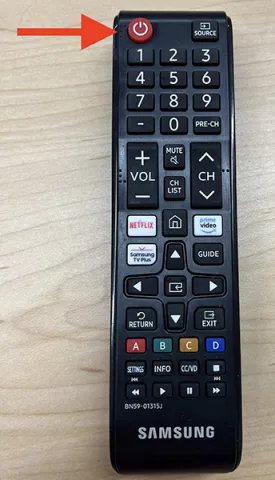
Aim the larger remote at the main TV and press the red power button
- Image
Desktop Login
W857 comes equipped with a built-in Mac Mini. To wake it, move the mouse or press any key on the keyboard. If there's no response, the Mac Mini may be turned off.
Turning on the Mac Mini
- Press the power button located on the back of the Mac Mini
Image

Log in to the Computer
- Use your UofL username and password to log in.
Image

Device Switching

Detecting Device


Screen Mirroring

Sound (Volume)
Here is how you manipulate the sound from the Mac Mini.
From the Main Computer
- After logging in, click the Control Centre icon in the top-right corner and adjust the sound slider.
Image

Remote:
Use the largest remote to adjust the volume by pressing the volume + or - buttons.
LAPTOP
Turning on the TVs
Aim the larger remote at the main TV and press the red power button
- Image
Device Switching


Detecting Device
Screen Mirroring: For Apple
Sound (Control Center): Apple
Here is how you manipulate the sound from an Apple laptop
- Click the Control Center icon in the top-right corner and adjust the sound slider
Image
Remote:
You can also use the remote to adjust the volume by pressing the volume + or - buttons.